
Download R Studio Data Recovery Software – data recovery, file recovery, R-Studio, recover deleted files, recover lost data, hard drive recovery, RAID recovery, data recovery software, recover files from formatted drive
Overview
R-Studio Data Recovery Software is a professional-grade utility designed for users facing critical data loss scenarios. Developed by R-Tools Technology, the application targets individuals and IT professionals who require reliable recovery of data lost due to viruses, malicious attacks, hardware malfunctions, or operating system crashes. Its primary purpose is to restore files from damaged, formatted, or deleted partitions across a broad spectrum of storage media, including local and network drives. The software is particularly valuable in environments where data integrity and continuity are paramount, such as small businesses, enterprise systems, and personal users managing irreplaceable files. The app functions as a specialized tool within the productivity category, offering a robust solution where standard recovery utilities fall short. Real-world use cases include recovering photos after accidental formatting, retrieving documents from a failed RAID array, or restoring data from a corrupted hard drive following a system crash. R-Studio’s extensive file system support enables it to operate across diverse environments, making it a versatile asset in both Windows and cross-platform recovery workflows. While the developer did not provide additional technical details about the company’s background, the software’s reputation in the data recovery space underscores its credibility and reliability. Its presence in the ecosystem fills a vital gap for users seeking advanced recovery capabilities beyond basic built-in tools.Key Features & Functionality
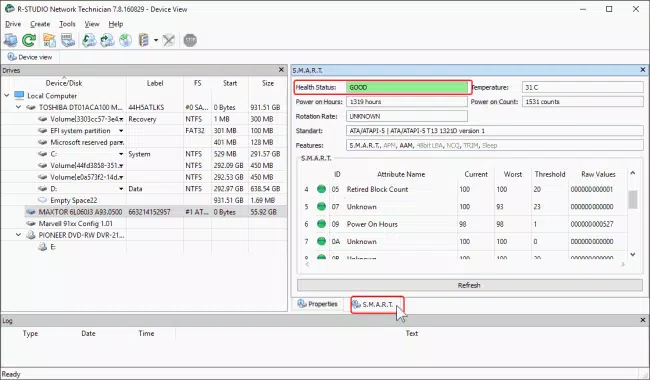
R-Studio Data Recovery Software delivers a suite of powerful tools tailored for complex data recovery scenarios. The software’s extensive file system support includes FAT/NTFS (all Windows versions), exFAT (for mobile and modern Windows systems), ReFS (Resilient File System), HFS/HFS+ (Mac), UFS1/UFS2, and Ext2FS/3FS/4FS. This breadth ensures compatibility with a wide range of storage devices and operating systems, enabling recovery from both local and networked drives—even when partitions are missing or corrupted. A standout feature is the advanced raw file recovery algorithm, which scans disk sectors for file signatures rather than relying solely on file system metadata. This approach significantly increases recovery success rates, especially in cases where file system structures are severely damaged. The software also supports dynamic disks and RAID configurations, including RAID6 and reverse RAIDs, with automatic parameter detection and parity delay handling. This makes it a go-to tool for recovering data from enterprise-level storage systems. The inclusion of a professional disk hex editor allows users to inspect and modify low-level disk structures such as MBR, boot sectors, and NTFS/MFT records. This granular control is invaluable for advanced users and IT specialists performing forensic-level recovery. Additionally, flexible parameter settings and S.M.A.R.T. monitoring provide real-time insights into hard drive health, helping users anticipate potential hardware failures before they occur. These features collectively empower users with comprehensive control over the recovery process, ensuring optimal results in high-stakes data recovery situations.- Support for FAT/NTFS, exFAT, ReFS, HFS/HFS+, UFS, and Ext file systems
- Advanced raw file recovery using signature-based scanning
- Dynamic disk and RAID 0/1/5/6, reverse RAID, and parity delay support
- Professional disk hex editor for low-level data manipulation
- Flexible recovery settings and S.M.A.R.T. attribute monitoring
Interface, UX & Performance
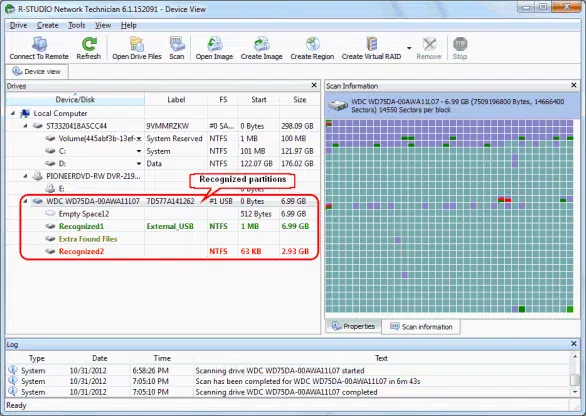
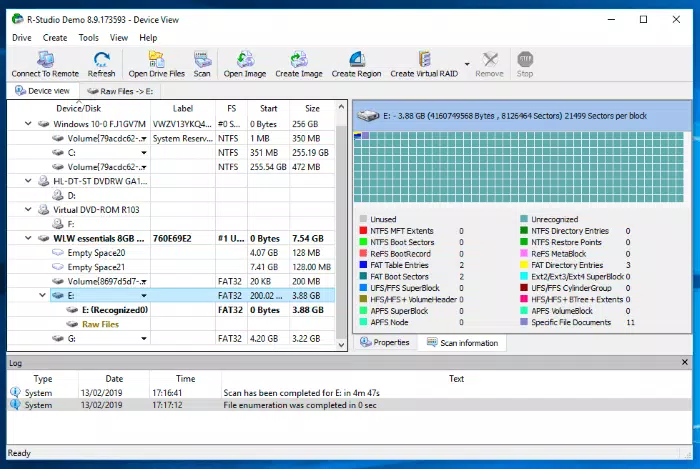
The user interface of R-Studio Data Recovery Software is designed with functionality and precision in mind, catering to both technical users and experienced IT professionals. The layout organizes recovery tasks into logical workflows, with clear navigation between disk selection, scan modes, and recovery options. Visual indicators guide users through the recovery process, and the interface maintains a consistent structure across different recovery scenarios. Navigation is intuitive, with step-by-step wizards for common recovery tasks and advanced mode for expert users who require fine-tuned control. Although the developer did not list formal performance metrics, the software is optimized to handle large storage devices efficiently. It performs well on systems with moderate to high-end specifications, though performance may vary depending on the drive’s condition and size. Responsiveness remains stable during deep scans and complex recovery operations, minimizing the risk of crashes or freezes. The application maintains stability even when processing heavily damaged or fragmented storage media. Users can pause and resume scans, and the software preserves progress, which is essential for lengthy recovery processes. While the interface is not designed for casual users, its professional tone and feature depth align with the app’s target audience. The lack of touch-based controls is expected, given the software’s desktop nature and Windows platform focus. Overall, the UX prioritizes control, accuracy, and reliability—key factors in high-stakes data recovery.Platform Compatibility & Technical Requirements
R-Studio Data Recovery Software is designed exclusively for the Windows platform, supporting Windows operating systems as specified by the developer. The current version is 10.3, with a file size of 125.5 MB. This compact footprint reflects the software’s efficient architecture and targeted functionality. The developer did not specify minimum OS requirements, nor did they list exact hardware specifications needed for optimal performance. Compatibility information was not fully disclosed, but the application is intended for use on desktop and laptop systems running Windows. It does not appear to be available for mobile platforms such as Android or iOS. Users should ensure their system meets general requirements for running data recovery tools, including sufficient RAM and processing power, especially when scanning large drives. The absence of mobile availability is consistent with the software’s role as a desktop utility for deep disk analysis and recovery operations.Pros and Cons
- Extensive file system support across Windows, Mac, and Linux environments
- Advanced raw file recovery algorithm increases recovery success rate
- Comprehensive RAID and dynamic disk recovery capabilities
- Professional disk hex editor enables low-level data manipulation
- Flexible settings and S.M.A.R.T. monitoring for proactive drive health tracking
- High price point of $299.00 may deter casual users
- Interface is complex and may require technical knowledge
- Not available for mobile platforms (Android, iOS)
- No official support for macOS or Linux systems
- Performance may vary depending on hardware and drive condition


